v2.7.1 - Added Welcome Screen to Player Window
New
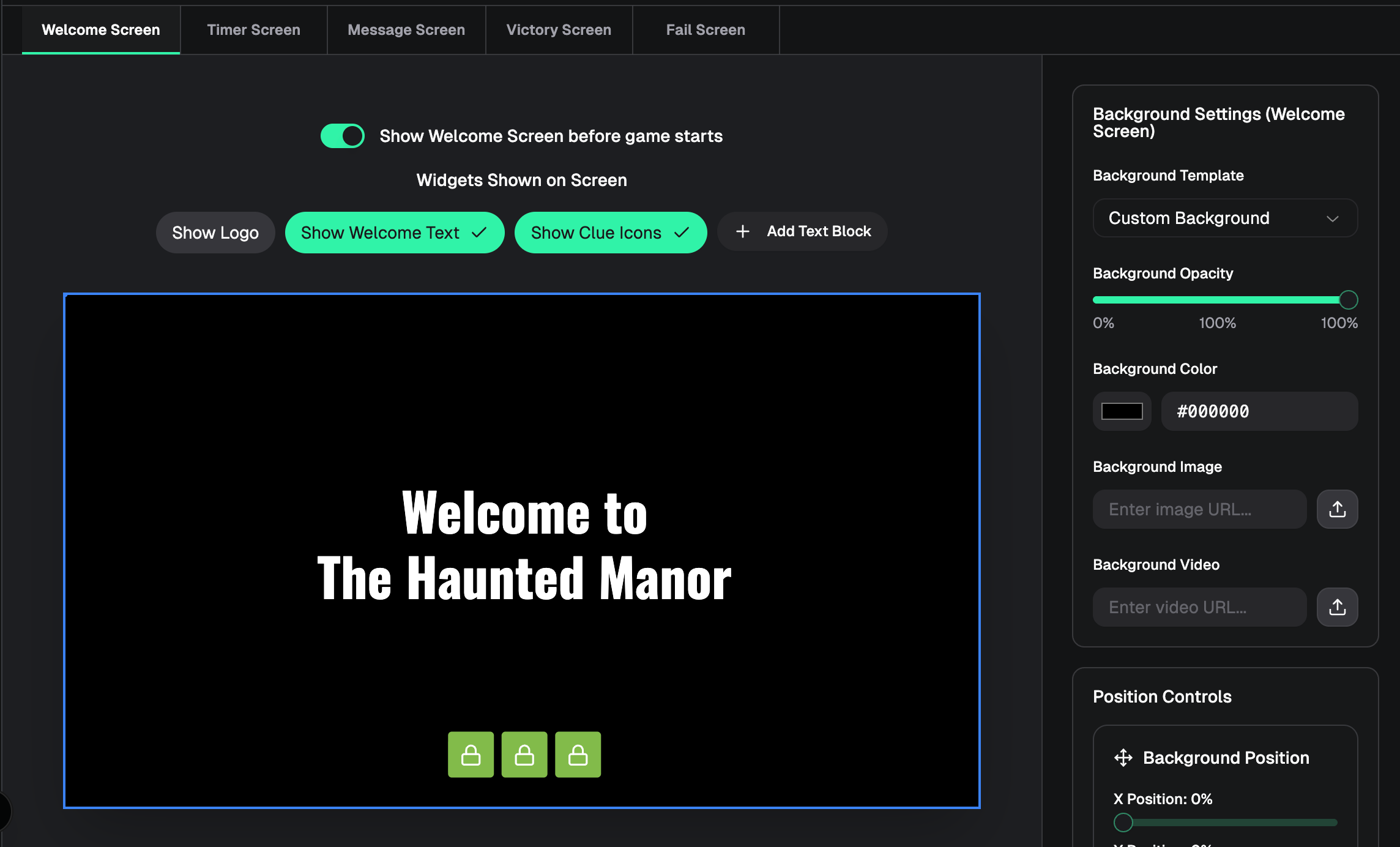
Welcome Screen — Optional pre-game screen on the player window, customizable in the designer with logo, welcome text, clue icons, background styling, and custom text blocks
Screen tabs — Designer screen picker is now a tab bar (Welcome, Timer, Message, Victory, Fail) instead of a dropdown
Message preview from real clues — Message screen designer preview uses the first text clue from your game instead of placeholder copy
Improved
Welcome screen off by default — Player window won’t show the welcome screen until you enable it in the designer and save
Welcome tab label — Shows “Welcome Screen (disabled)” when the welcome screen is turned off
Message widget settings — Sidebar styling now matches timer, logo, and other widget panels
Designer preview sizing — Preview keeps the correct 16:9 aspect ratio when the window is wide and short
Designer navigation — Sidebar back button returns to the game console (not the dashboard) while in the designer
Fixed
Welcome screen background color not updating in the designer preview
Trash icon on welcome screen custom text blocks not removing the block
Message screen logo placeholder looking different from other screens
Smooth welcome → timer transition on the live player window (from earlier in this work)